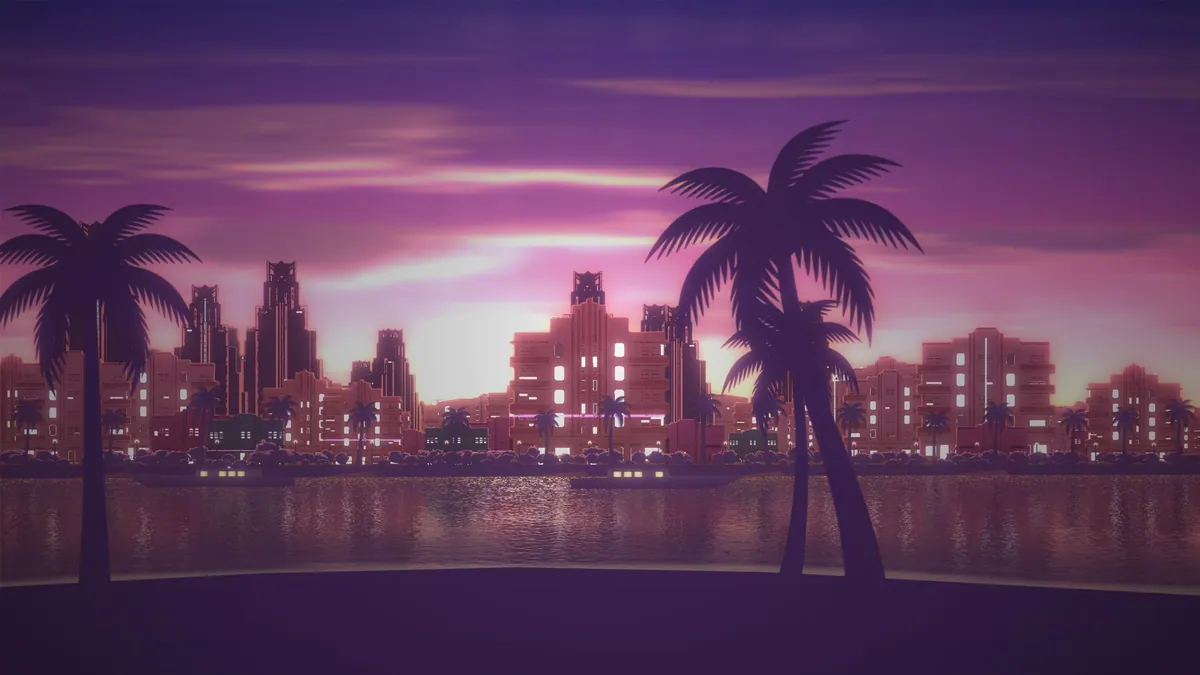
Vice, a free GTA 6 live wallpaper, turns your screen into a synthwave Vice City bay that moves with your songs. A new (members-only) Logo tab can put your logo over it in 3D. Here's how to set it up and add your logo.
What Launched on VibeSynced for GTA 6 Launch Week
Two new things went live for GTA 6 Launch Week. The first is Vice, a free scene inspired by Vice City Miami.
Vice shows a synthwave Miami-style bay with palms, a city skyline and boats. You'll find it in the scene picker, labeled "Vice".
It reacts to music in a subtle way. The neon pulses and the city windows brighten on the beat.
The wind and the boats pick up with the song's energy, too. Nothing flashes or shakes, so the bay stays easy to watch.
The second launch is the Logo tab (Members only). It places your own 3D logo over the scene, right above the water.
You can try Vice in VibeSynced right now. It costs nothing to use.
Three Vice City Scenes to Pick From
Vice comes with 3 views of the same bay. Each one puts you in a different spot along the shore.
- Sunset Bay: you look from the beach across the bay, with the sun behind the skyline.
- Open Water: you look from the promenade across open water to the city.
- Marina: you look from the beach to the waterfront, with boats, lamps and palms.
Pick Sunset Bay if you want the skyline front and center. Pick Marina if you want boats and palms close up.
Quick Setup Before Your First Session
Getting Vice running takes just a few taps. Follow these steps.
- Open VibeSynced.
- Open the scene picker.
- Pick "Vice".
- Choose Sunset Bay, Open Water or Marina.
- Start a song.
Need a song? These 3 tracks from GTA VI: The Album are a good start.
- "Flower in a Hurricane": Justice featuring Tame Impala, SZA and King Gizzard & the Lizard Wizard. It's the launch trailer song.
- "RHYNO": Travis Scott. Daft Punk's Guy-Manuel de Homem-Christo produced it.
- "Blood In Your Eyes": Tove Lo. It came out November 10, 2026, and Rockstar used it in the pre-load promo video.
(More: every single from GTA VI: The Album so far.)
Neon, Day Cycle and Time of Day Settings
Open the Vice settings to change the light and the mood. You'll see these options.
- Day cycle: on by default. One full cycle takes 1 minute.
- Time: a slider that holds the light at Golden hour, Sunset, Twilight or Dusk.
- Neon: pick None, Subtle or Full '80s.
- Ambient motion and Pointer parallax: 2 more ways to control movement in the scene.
- Reset Vice: returns every Vice setting to its default.
Want one fixed look instead of a moving sky? Use the Time slider to hold the light at Dusk or Twilight.
For the strongest Vice City feel, set Neon to Full '80s.
Put Your own Logo in 3D
Open the Logo tab (Members only) and add a Text, SVG or Image layer. Pick a material, like Neon or Chrome. Then switch on "Show logos over the visual" and your logo floats in 3D over the Vice scene.
- Open the Logo tab (Members only).
- Add a Text, SVG or Image layer.
- Pick a material, such as Neon or Chrome.
- Switch on "Show logos over the visual".
A Text layer fits a gamertag or crew name up to 40 characters. Fonts include Bebas Neue, Orbitron, Pacifico, Righteous, Archivo Black and Montserrat.
Already have a crew logo? Upload it as an SVG, and its filled shapes turn into 3D.
PNG and JPG images work too, up to 2 MB. They show as a flat card instead of a 3D shape.
Logo Materials From Chrome to Holo
Every logo gets a material. Choose from Matte, Chrome, Glass, Neon, Holo and Scene.
Three sliders shape it further: Depth, Bevel and Glow. Blend modes such as Screen and Add change how the logo mixes with the bay.
Add gives "a hotter glow than Screen," and the app notes it's "Good with Neon." Try that pair against a dark sky.
Make the Logo Move With the Music
Music reactions are Kick Pulse, Bass Glow, Hue Shift, Drop Shake, Breathe and Off. With Bass Glow, the glow swells with the bass.
Movement options are Spin, Drift, Bounce, Orbit and Figure-8. Spin also has a Sync to tempo option.
Launch-Week Logo Recipe
Want a starting point? This setup leans hard into Vice City.
- Scene: Marina
- Neon: Full '80s
- Text: your name in Pacifico
- Material: Neon, with the Add blend
- Reaction: Bass Glow
Free Preview vs the Members-Only Logo Tab
Vice itself is free for everyone. Every scene and every Vice setting above works without a membership.
Logo is a members-only tab. Non-members get a short free preview, so you can see your name on the bay first.
Your logos are saved on this device, one for each scene. Turn on "Use on all scenes" to make one logo the default wherever a scene has none.
(More: the full Logo tab walkthrough.)
Try Vice in VibeSynced
Vice suits synthwave, '80s-style pop and the GTA VI soundtrack. Tap one to jump straight into the app with that particle already running.
Best match
Vice
A synthwave Vice City bay for GTA VI soundtrack sessions and retro synth pop.
Play in VIBESYNCEDOr try
GTA 6 Live Wallpaper FAQ
Does Vice work without a membership?
Yes. Vice is a free scene, and only the Logo tab is Members only, with a short free preview.
Can I upload an SVG of my crew logo?
Yes. Add an SVG layer and its filled shapes become a 3D logo.
What is the largest image I can use as a logo?
PNG and JPG files can be up to 2 MB. They appear as a flat card over the scene.
Can the logo spin in time with the music?
Yes. Pick Spin as the movement and turn on Sync to tempo.
- ◉Live visualizers
- ♪Synced lyrics
- ⚡︎No download